EE 2212
Spring 2013
31 January 2013
Experiment 1: RC Circuits-Frequency and
Time Domain Response Measurements
Note: Experiment 1 report due
Thursday, 7 February
in lab.
LABORATORY NOTEBOOKS AND INFORMATION
Ø LabInfo.docx includes
overall requirements and the laboratory report grading rubric
Ø Every student will
keep a patent-style laboratory notebook.
Patent-style refers to a numbered page bound
notebook. Loose leaf binders are not
allowed. Everything you do
in lab and related to the lab which includes lab preparation, in-lab
discussion, prelabs, data, comments
during the lab, etc. are to be included in the notebook.
Ø The notebook is a
stand-alone document from which a colleague would be able to understand and
reproduce your results. This means key
diagrams, connection diagrams, design equations, etc.
Ø If there are
errors or problems in the lab, these are also to be included in your notebook
so that a colleague could study the approach you took to move to a better approach.
Ø No loose sheets of
paper are to be used for data collection.
Ø Date your entries.
Ø You can tape or
staple in graphs, screen dumps, SPICE plots, etc and/or alternatively,
reference locations where data files, Flash drives, etc. where such lab data
resides should anyone request to see it.
Ø Your notebook is
your key working document from which you can generate high-quality
reports. I encourage you to annotate
your results with key statements, comments, and conclusions as you proceed
though the experiments.
Ø I will review your
notebooks periodically through the semester.
Ø If any equipment
is not working or if there are no components in the bins, do not keep it a
secret. Please let me know so that I can
address the problem.
NOW TO THE EXPERIMENT
OBJECTIVES
This laboratory
is designed to be a review of some key EE 2006 concepts and a review of the lab
equipment operation..
Ø Review the
operation of the Tektronix TDS 3012B
Two-Channel Color Digital Oscilloscope,
Agilent (Hewlett Packard) 33120A
Function Generator, Agilent 3631A Power Supply, Impedance Bridge for measuring
capacitor values, and the LAN to from the oscilloscope to the computer and
printer.
Ø Be able to print
Tektronix TDS 3012B screens to the networked printer on each bench.
Ø Be able to store
Tektronix TDS 3012B screens to your flash drive on the networked computer.
Ø Be able to insert
images from SPICE and Tektronix TDS 3012B screens into document files.
Ø Measure and plot
the time and frequency domain responses of single section RC circuits.
Ø Apply the RC
response to illustrate the concept of a passive element integrator and
differentiator in the time domain.
Ø Use SPICE for .AC
and .TRAN simulations to compare with your analysis and measurements.
PRELAB
Ø You must have a
patent-style laboratory notebook with you.
That is a bound notebook (not looseleaf) with
numbered pages.
Ø Review the
appropriate EE 2006 material related to first-order time domain system
responses and frequency domain impedance concepts.
Ø Review EE 2006
topics related to first-order systems time and frequency domain analysis.
Ø Review SPICE material from EE 2006 so that you will be able to write and run SPICE programs for each of the circuits for this lab. SPICE is also available on the computers in the laboratory and those of you with wireless laptops can also access the network from 391 MWAH. Print the waveforms of the inputs and outputs on the same set of axes. You will need to read the entire experiment to be able to understand what is expected and where you will need the SPICE graphs. You will need the following information from your SPICE simulation in order to complete this lab:
·
3 dB BW (bandwidth), tr
(rise time), t (time constant), key amplitudes and
times
·
.AC analysis of frequency and phase for the frequency domain
·
.TRAN analysis for the time domain
PROCEDURE
1. Circuit 1 (Time Domain and Frequency Domain Response)
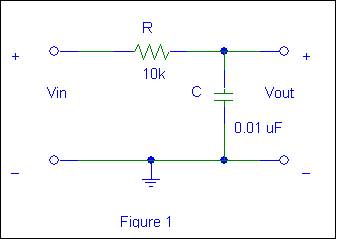
TIME
DOMAIN RESPONSE (Integrator)
Ø Construct the
circuit in Figure 1.
Ø Drive it with a 2
volt peak-to-peak
square wave (amplitude is not critical) and observe the
output. You will need to adjust the
frequency of the square wave such that key attributes of the waveform are
shown. To measure the time constant t, determine t63% which is the time
required for the output to reach 63% of its final value during a half-cycle of
the input. Does it equal the actual
value of the RC product for your measured values of the resistors and
capacitors you are using? Why or why not?
You may need to vary the horizontal time scale and vertical gain of the
oscilloscope (and the amplitude of the input, if needed) to attain this
measurement. Save key waveforms on
flash drive. Measure and record the time
constant t.
Ø Also, measure the
rise time tr
and record. ( tr
= t90% - t10% = 2.2t). Finally, compare the theoretical,
experimental, and SPICE values of time constant and rise time. Many of these measurements can be done by
using settings within the oscilloscope “MEASURE” menu.
Ø Drive the circuit
in Figure 1 with a square wave approximately in the 2 kHz to 30 kHz range. Adjust your amplitude appropriately to
observe key waveform attributes. Observe
the input and output waveforms and measure key amplitudes and times. Compare
the input and output waveforms from your SPICE program to that of the
oscilloscope waveforms. Are they the same? Why does the output have the shape
that you see? Again, exercise the
automated settings within the “MEASURE” menu to support your results. Compare the automated measurements with
visual observation of the key waveform attributes.
Ø Now apply a
triangular wave to the input of the circuit. Note input and output waveforms,
amplitudes and times. Do these measurements agree with the values and expected
circuit time response you found using SPICE?
Ø Reapply the square wave and decrease the
frequency until the output shape deviates appreciably from an integrator
response. Why does the output no longer appear linear?
Ø Fill in the
following table:
|
Parameter |
Calculated |
SPICE |
Measured |
Comments |
|
Rise
Time |
|
|
|
|
|
Time
Constant |
|
|
|
|
Frequency
Domain Response (Low-Pass Filter)
The
circuit in Figure 1 is also a basic single-pole analog passive low-pass filter
(LPF). This LPF function can be observed by applying a constant-amplitude (i.e.
2 volt peak-to-peak
amplitude input sinusoid and varying the frequency from 100 Hz to > 30 kHz.
Ø Measure and record
the "low-frequency" (f = 100 Hz) gain and phase shift. Use the
magnitude of this gain to measure accurately the – dB corner frequency of the
filter, and the phase shift. (Note that
–3 dB corresponds to 70.7% of the low-frequency gain). Again, you can obtain phase directly from the
“MEASURE” menu and visually verify by looking at the waveforms. Compare these measurements with theoretical
and PSPICE values. Many of these measurements can be done by using settings
within the oscilloscope
“MEASURE” menu. Measure
and plot the gain and phase shift at several frequencies out to >30 kHz. Is
the high-frequency gain roll-off about –6dB/octave (-20dB/decade) as the frequency
is increased? Plot the data as you
change the frequency to ascertain the detail you need.
Ø Finally, using
SPICE, show a db plot
of 20 log |A(jf)| and a phase plot of q (jf) (voltage gain and phase as a
function of frequency) of the circuit of Figure 1 Vary the frequency from 100
Hz to >30kHz. Select data points that show the key features of the
curves.
|
Parameter |
Calculated |
SPICE |
Measured |
Comments |
|
Low
Frequency Gain |
|
|
|
|
|
Low
Frequency Phase |
|
|
|
|
|
3 dB
Frequency |
|
|
|
|
|
Gain
at 3 dB Frequency |
|
|
|
|
|
Phase
at 3 dB Frequency |
|
|
|
|
Ø
2. Circuit 2 (Time
Domain and Frequency Domain
Response)
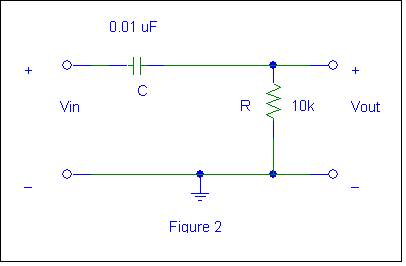
TIME DOMAIN RESPONSE
(Differentiator)
Ø Construct the
circuit of Figure 2. Drive it with a 2 volt peak-to-peak, square wave and observe the
output. You will need to adjust the
frequency of the square wave such that key attributes of the waveform are
shown. Does it match the SPICE program
you wrote? Can you explain the shape of the output waveform? Give theoretical
justification.
Ø Measure t 37%
(the time required for the output to fall to 37% of its peak value during the
appropriate half-cycle of the input). Does it equal the actual value of the
time constant of the circuit? Also measure the fall time t f = t 10%
- t 90% = 2.2t.
Ø Now apply a 30 Hz
triangular wave to the input of the circuit. Note the key amplitudes and times.
Does it match your SPICE graphs for this circuit? You will have to increase the vertical
sensitivity of the scope and/or the input amplitude to observe the output.
|
Parameter |
Calculated |
SPICE |
Measured |
Comments |
|
Rise
Time |
|
|
|
|
|
Time
Constant |
|
|
|
|
FREQUENCY
DOMAIN RESPONSE
The
circuit in Figure 2 is also a basic single-pole passive high-pass filter. To see
this, observe the amplitude of the output as the frequency is varied from >30 kHz down
to 100 Hz. You will need to use a 2 volt peak-to-peak constant-amplitude input sinusoid.
Ø Measure the
high-frequency (f >30 kHz) gain and phase shift. Use the magnitude of this
gain to measure fc and the phase shift
there. Compare these measurements with your PSPICE values.
Ø Measure the gain
and the phase shift of the filter at low frequencies. Is the low-frequency gain
roll-off about -6dB/octave as the frequency is decreased? Again, Many of these measurements can be
done by using settings within the oscilloscope “MEASURE” menu.
Ø Finally, using
SPICE, show a plot of 20 log |A(jf)|
and q(jf) of the circuit of Figure 2. Vary the frequency from 30 Hz to
30 kHz. Select data points that show the key features of the curves. Again, plot the data as you proceed and
change the frequency.
|
Parameter |
Calculated |
SPICE |
Measured |
Comments |
|
High
Frequency Gain |
|
|
|
|
|
High Frequency Phase |
|
|
|
|
|
3 dB
Frequency |
|
|
|
|
|
Gain
at 3 dB Frequency |
|
|
|
|
|
Phase
at 3 dB Frequency |
|
|
|
|
Ø
Now for a little technically appropriate
humor.