This assignment will continue the encapsulation practice from a
previous lab exercise, and also give you a chance to write code for
unit testing.
You will add to the
Matrix NetBeans project created
in the previous lab exercise.
Your tasks for this assignment are:
- Implement the following matrix actions:
- Fill Row-Wise
- Fill Column-Wise
- Make Identity
- Transpose
- Test the above actions with JUnit tests provided for you
- Implement the following matrix operations:
- Test for Equality
- Add
- Multiply
- Test the above operations with JUnit tests written by you
- Demonstrate everything by running the matrix GUI
To implement the actions, complete
the
fillRowWise,
fillColumnWise,
makeIdentity,
and
transpose methods that were defined, but not implemented, in
the
Matrix interface given to you in the previous lab exercise
(shown below — the methods in question are at the bottom).
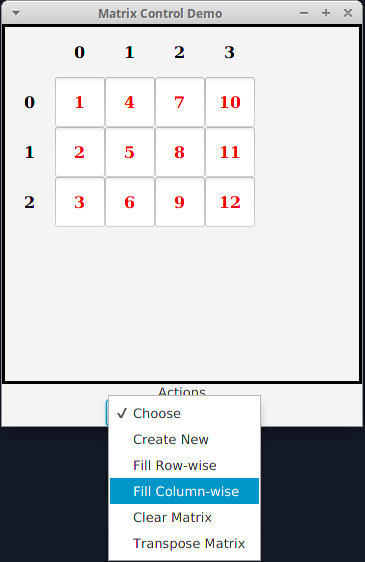
How these actions work are described via the menu shown to the left.
You will test your actions through both unit tests and by demonstrating
them in a GUI.
Run the provided
MatrixTest.java file shown below.
- This file should replace the file of the same name currently
in your Matrix project
- Study the testFillRowWise, testFillColumnWise,
testTranspose, and testMakeIdentity methods to
see how your actions are tested
- Run the MatrixTest.java file. All nine tests should
succeed.
Once all your unit tests succeed, run the
provided
MatrixControlTest.java file found in the
gui
test package to get the tool shown below. You should be able to
demonstrate all your actions through the
Actions choicebox.
To implement the operations, complete
the
equals,
add, and
multiply methods that were
defined, but not implemented, in
the
AbstractMatrix class given to you in the previous lab
exercise and shown below.
How these actions work are described via the menu shown to the left.
Pay particular attention to the Javadoc comment for the
equals
method. You need to cast the
Object parameter to
Matrix
before using it. Generally, you need to check the type before casting,
but our tests only send
Matrix objects, so in this case type
checking is not necessary.
You will test your operations by both writing and executing unit tests
and by demonstrating them in a GUI.
Uncomment the
testEquals,
testAdd,
and
testMultiply methods that are defined
in
MatrixTest.java, shown below (the methods are at the bottom).
Now provide implementations for them:
- Read the comments for guidance on what these methods should
do
- Look at the many other implemented test methods in the file as
models, particularly the tryBadIndex
and testMakeIdentity methods for how they deal with
exceptions
Try to make your tests as exhaustive as possible — remember that
the goal of testing is to expose bugs.
Run the
MatrixTest.java file again. This time 12 tests should
succeed.
Once all your unit tests succeed, run the
provided
MatrixOperationTest.java file found in the
gui
test package to get the tool shown below. You should be able to
demonstrate all your operations through the
Operations choicebox.

The additional files required for this assignment, beyond those used in
the previous lab exercise, are available from the menu on the left.
As in the
Encapsulation Lab
exercise (see menu at left),
when your matrix project is working correctly, use
the
Export Project > To ZIP... file feature to create
Matrix.zip and submit it to
.
Your project will be inspected and run by the lab instructor. Grading criteria:
- Successful implementation of the matrix actions : 12 points
- Successful implementation of the matrix operations : 12 points
- Successful implementation of the test methods for the matrix operations:
6 points
Note the general
Submission Policy in the menu at left.