This lab exercise will give you practice working with
Java threads.
You will take a set of classes that simulate the use of a
bank account
by multiple users and modify it to give the simulation realistic,
multi-threaded behavior.
Basic Requirements
The program allows control of the following aspects of a
bank
account:
- Starting balance
- Number of users having access to the account
- Number of transactions allowed per user
- Transaction amount limit
We imagine a scenario in which a number of
siblings are given access to
a bank account by a
parent.
For each
simulation run:
- A bank account's balance is set to the indicated starting amount
- The indicated number of bank account users — siblings
— are created
- For each sibling, a list of the indicated number of transactions,
randomly created as deposits or withdrawals, of random amounts
in the range governed by the indicated limit, is created
- Each sibling carries out its list of transactions, with the
constraint that the balance cannot go below zero
- The result of each transaction is displayed in a transaction log
In the version of the program you are given,
the siblings' transaction lists are processed in
series —
a sibling carries out all of the transactions on its list before
another sibling can carry out its transactions.
This creates two deficiencies:
- The simulation is not realistic — the siblings should
carry out their transactions in parallel
- If a sibling happens to attempt a withdrawal causing a negative
balance, the simulation halts, and remaining siblings are denied
their transactions
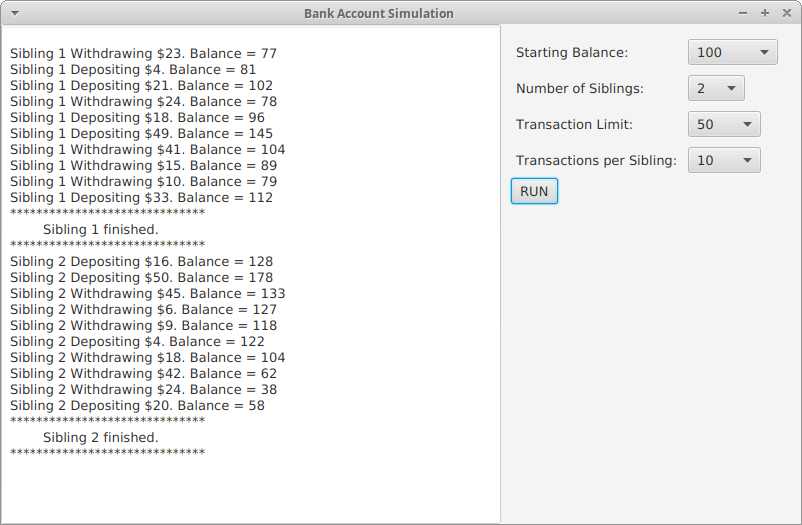
Below is a screen shot of the simulation after clicking
RUN with
two siblings.
Although all transactions for each sibling are carried out, all of
Sibling 1's transactions are carried out before any of Sibling 2's
transactions, which is unfair to Sibling 2.
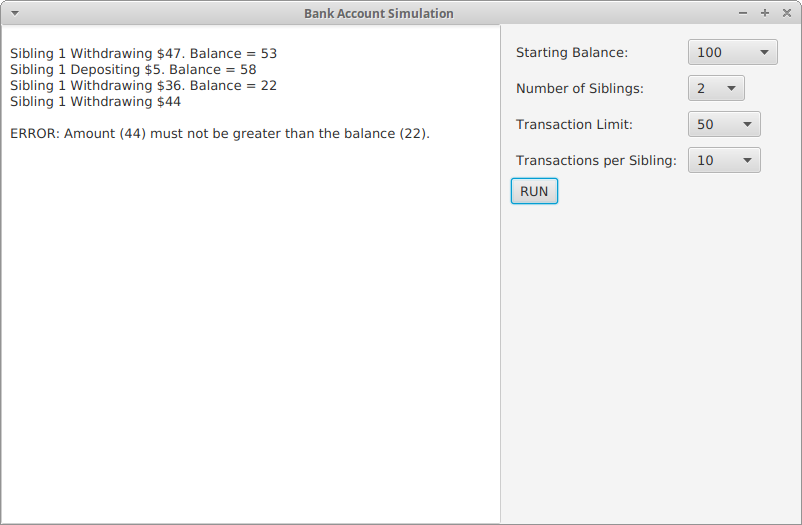
Below is a screen shot showing what happens when a withdrawal would
cause the balance to go negative. Note that an error is signalled and
any remaining transactions are cancelled.
This is not optimal, since if Sibling 2 had been allowed to make a
transaction, it may not have caused a negative balance.
You will correct these deficiences by making each sibling's transaction
processing occur in a separate
thread, making sure to avoid
potential
race conditions and
deadlocks.
Additionally, you will add a
parent
thread that "rescues" the siblings from deadlock by making deposits when
appropriate. Here are the related requirements:
- The siblings' transactions will be carried out in
parallel, with it possibly happening that when one sibling attemps
an illegal withdrawal, another sibling bails the first out with a
deposit.
- Whenever all non-finished siblings try to make an illegal
withdrawal, i.e. deadlock occurs, the parent thread rescues with
(possibly repeated) deposits of $100,
- The parent is only involved when the siblings are deadlocked.
- No situation results in any sibling's not carrying out all of its
transactions.
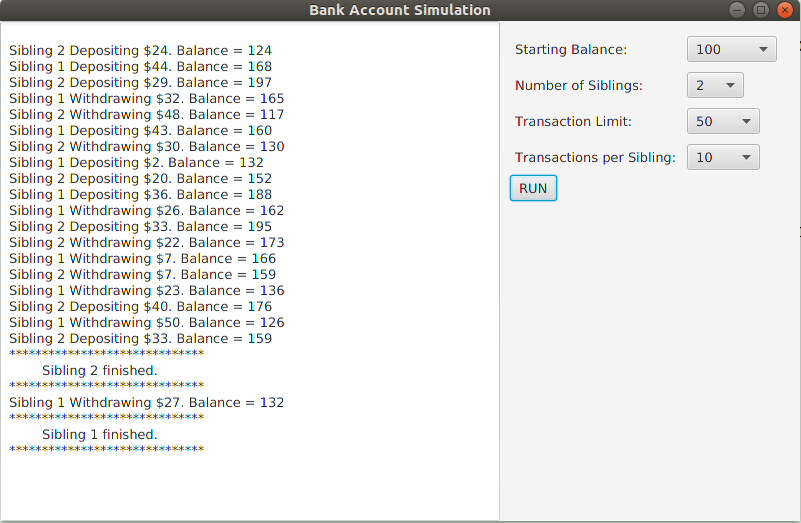
In the simplest case, no sibling attempts an illegal withdrawal, but
the transactions occur in parallel:
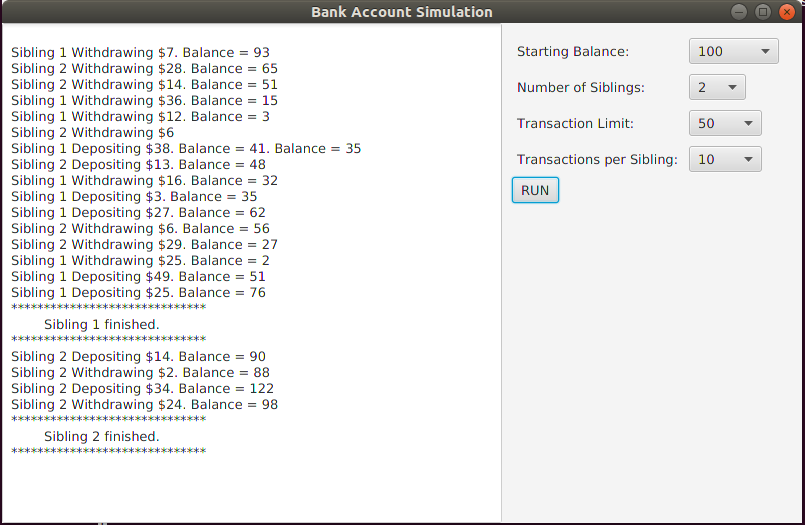
When one sibling attempts an illegal withdrawal, its thread waits until
the balance is increased, perhaps by another sibling making a scheduled
deposit:
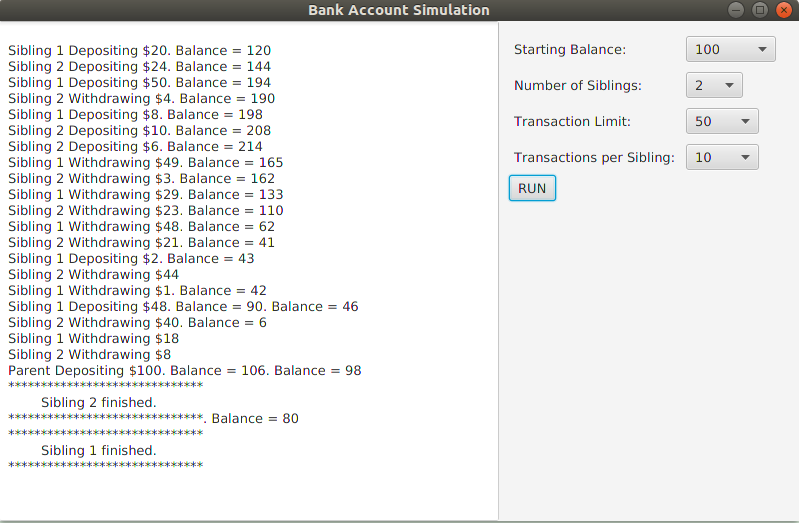
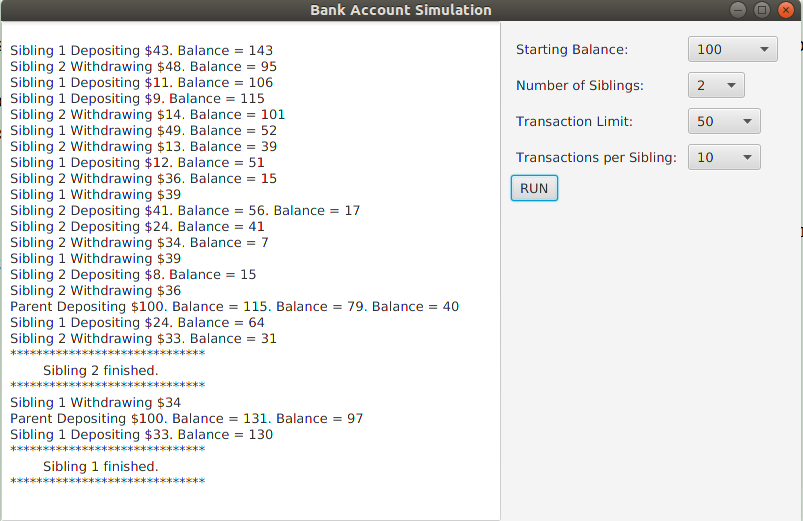
When all siblings are trying to make an illegal withdrawal, then there
is deadlock, and the parent thread makes a $100 deposit, as in the next
screenshot, which first shows one sibling bailing out another, and then
the parent rescuing both. The bottom screenshot shows that the parent may need to
make multiple deposits during the course of the simulation.
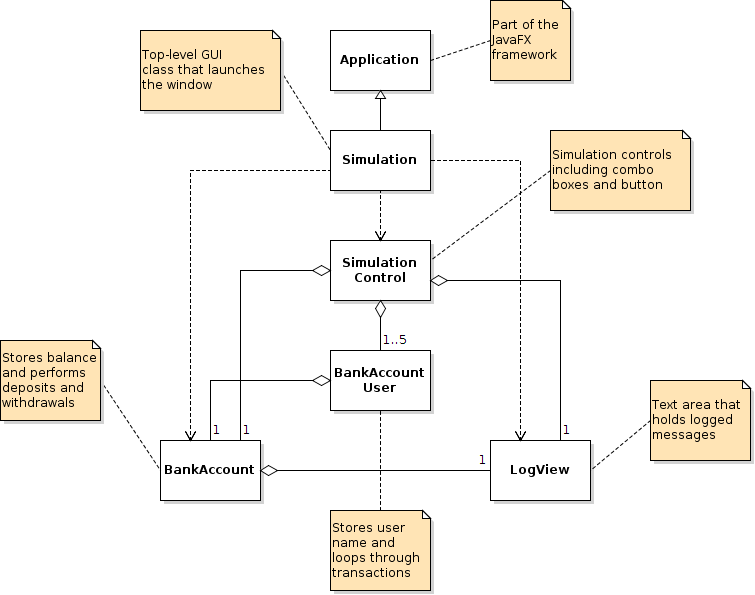
Shown below is an annotated class diagram of the simulation
application.
The menu shows the classes you are given.
First, create a new NetBeans project:
- Download this Threads.zip file to
an appropriate location on your machine.
- Create a new project in NetBeans by selecting File > Import
Project > From ZIP... and choosing the zip file you
just downloaded. This will create a project called Threads.
- Run the project. You should get the same
behavior as described in the Requirements section
under Current Behavior.
The exercise will proceed in three steps:
- Thread the program
- Synchronize the threads
- Rescue the threads from deadlocks
The
BankAccountUser class has code in its
run method that
we want to run in a separate thread.
In this step, you will simply thread the program (without
synchronizing) and observe the results.
One way to make the
run method execute in separate threads is
to make some changes to
BankAccountUser
and
SimulationControl.
Introducing threads will also require a change to the
LogView
class.
SimulationControl and
LogView make use of JavaFX, which
we have yet to discuss. However, you can make the changes required
without fully understanding JavaFX at this time.
Declare
BankAccountUser to extend the
Thread
class.
Since the
Thread class already has a
getName
method:
- Remove this method from BankAccountUser
- Remove the name instance field
- In the constructor, replace the statement "this.name = name;" with
"super(name);"
This hands the duty of storing
name to the superclass
(
Thread).
At the bottom of
BankAccountUser's
run
method's
for loop, just before repeating, make a call
to
Thread.sleep.
A call like
may produce perfectly
interleaved behavior, while
will produce more
realistic results.
Either way will require handling a
possible
InterruptedException
In SimulationControl, change the call user.run()
to user.start().
The creation of multiple threads introduces synchronization issues
with the JavaFX thread. We will learn more about JavaFX later, but
to avoid these issues, in
LogView.java replace the line:
with:
Do a
Clean and Build on your project to make
sure these changes take effect.
Now try running the simulation.
For one sibling:
- The behavior is fine if no illegal withdrawals are
attempted
- If an illegal withdrawal is attempted, a runtime
exception is thrown. Note that since the exception is thrown in
its own thread, it is not caught and displayed in the logging
area as before. When this happens, the application should be
exited, as further outputs are corrupted.
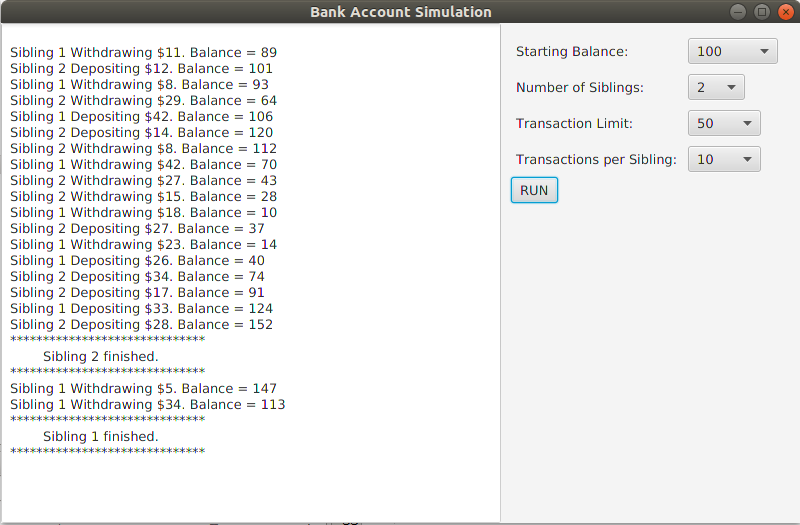
For multiple siblings, by sheer luck all transactions might get
completed:
Otherwise, if one sibling attempts to make an illegal withdrawal, it
will cause an exception in its thread, but another thread might be able
to continue and even finish:
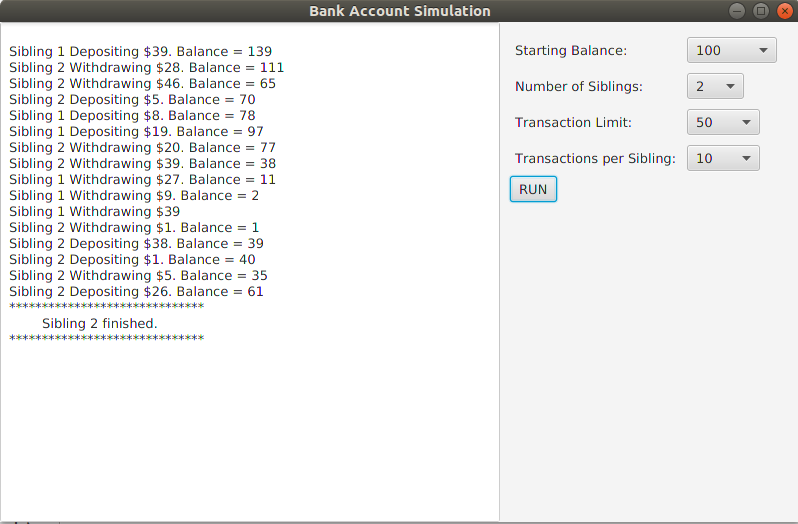
In this case, if Sibling 1 had not caused an exception, it might have
continued after Sibling 2 changed the account balance.
To fix this, the threads need to be
synchronized.
In this step you will eliminate the runtime exceptions
by synchronizing the threads using the Object
class's wait() and notifyAll() methods, and observe the results.
When a sibling thread attempts to make an illegal withdrawal, instead
of throwing an exception it should wait while other threads possibly
change the balance.
So the
withdraw and
deposit methods of
the
BankAccount class need to be modified:
- For each of these methods add the synchronized modifier
to the method's declaration
- In withdraw, instead of throwing an exception when an
illegal withdrawal is
attempted, make a call to wait() while the withdrawal
amount is greater than the balance
- Declare the withdraw method to
throw InterruptedException (which is handled by
the BankAccountUser's run method)
- At the end of the deposit method, just before the
assertion, make a call to notifyAll()
For one sibling, everything is fine if no illegal withdrawals are
made. If one is attempted, there will be no exception, but the thread
will wait for an event that cannot occur — deadlock.
For multiple siblings, if one attempts an illegal withdrawal, it may
get bailed out by another sibling. In the simulation below, Sibling 1
attempts an illegal withdrawal, waits, and continues after Sibling 2
makes a deposit. Sibling 2 eventually finishes, but Sibling 1 reaches
deadlock:
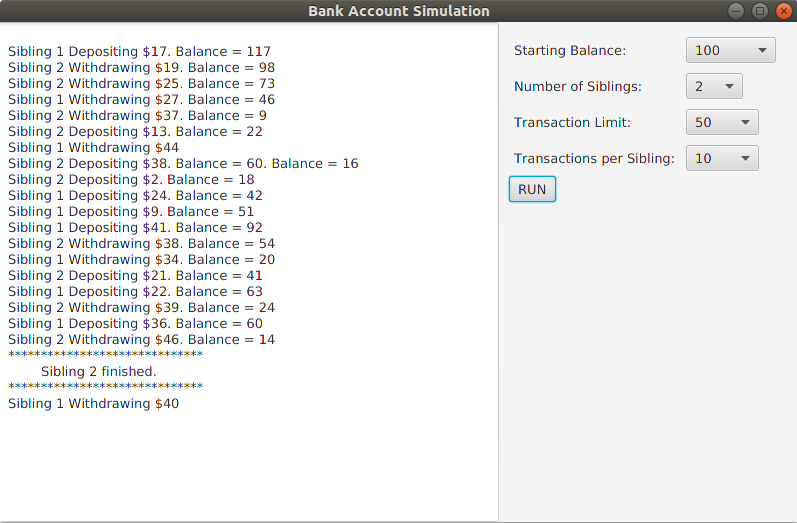
In the simulation below, both siblings reach deadlock, so the program
hangs. In the next step, you will eliminate the possibility of deadlock.
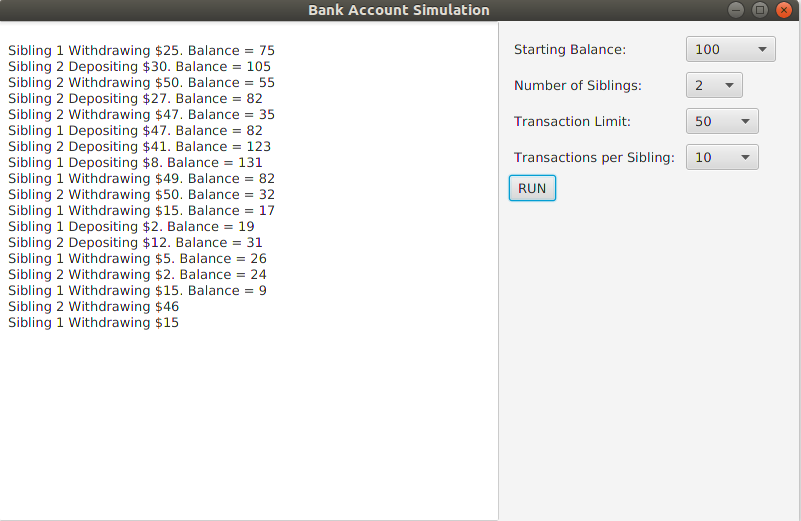
When you successfully complete this step, you will have synchronized
the sibling threads, but you will not have eliminated the possibility
of deadlock, which is addressed in Step 3.
So it may happen that a test run (the result of clicking the
Run
button) will end in a deadlock. If this happens, and you want to run
another test, you must force the application to quit and then restart
it. If you do not, the simulation will be in an inconsistent
state and produce confusing results.
If simply closing the simulation window does not stop the application,
you will notice that the label "Threads (run-single)" persists in the
status line near the lower right corner of the IDE.
You can force a quit by clicking the small box labeled with "x" near
this label. NetBeans will put up a dialog to confirm your intention
to quit.
In this step you will add a thread whose sole purpose is to
rescue the
sibling threads from deadlock.
This thread, analogous to the siblings'
parent, will be executed
by the
run method of a new
BankAccountRescuer class,
which will extend
BankAccountUser.
The
BankAccountRescuer thread will:
- Detect when all siblings are waiting to make a withdrawal
- Deposit $100 when all siblings are waiting
- Terminate when all siblings are finished
Upon completion of this step the overall class diagram will look as
shown below. You will add a new
BankAccountRescuer class and
make minor changes to some existing classes.
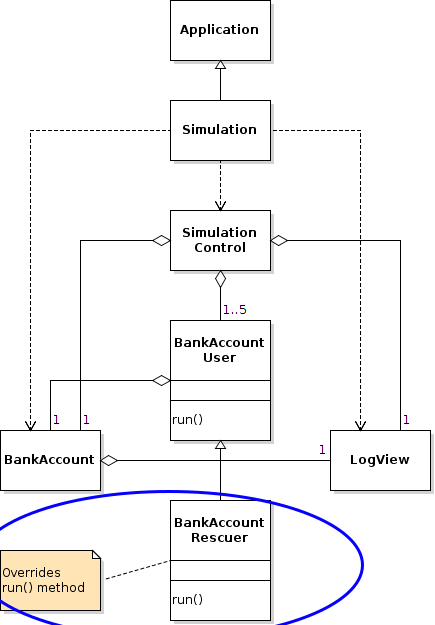
The parent thread must be able to detect when all non-finished sibling
threads are waiting. Begin by making these modifications:
- Add a boolean instance field waiting with setter and getter
to BankAccountUser and initialize it to false
- In the BankAccount class's withdraw method:
- When the user tries to withdraw more than the balance, the
user's waiting status is set to true before entering
the wait() loop
- When the loop is finished, the waiting status is set
to false
- Create a new class called BankAccountRescuer that
extends BankAccountUser
- Create a BankAccountRescuer constructor that:
- Takes a name, a BankAccount, and an array
of BankAccountUsers as parameters
- Appropriately calls super (can send a null list
of transactions, but the BankAccountUser constructor
will have to deal with that) and stores the user array
- Override the run method so that:
- It loops indefinitely until all siblings have completed all
their transactions
- Inside the loop, the thread checks if all non-finished users
are waiting, and deposits $100 if they are
- Suggestions:
- If the BankAccountRescuer constructor sends
a null transaction list to the BankAccountUser
constructor, the latter must guard against a null pointer
error by checking for null and setting the number of
transactions to zero if so
- In order for the BankAccount object to be available
to BankAccountRescuer, you can either:
- Add a getAccount method
to BankAccountUser, or
- Store the BankAccount object in an instance field
of BankAccountRescuer
- For BankAccountRescuer, write private allFinished() and allWaiting()
methods that loop through the user array and return the
appropriate boolean values
- allWaiting() should only consider non-finished users
- Like any thread loop, BankAccountRescuer's run
method should occasionally sleep
The
SimulationControl class creates and starts all the sibling
threads. It should be modified to also create and start the parent thread.
SimulationControl uses JavaFX components, which we will learn
about later. However, the modifications you need to make do not require
understanding JavaFX at this time.
To add the parent thread:
- Add an instance field parent of
type BankAccountRescuer
- In generateUsers, just after the loop that fills
the users array, set parent to a newly
constructed BankAccountRescuer
- In the private class Runner, just after the loop that
starts each of the sibling threads, start the parent thread
The program should now display the desired behavior.
When your bank account simulation is working correctly:
- Zip (compress) your src folder as src.zip.
- Submit src.zip by going to
and clicking Submission under Lab Exercise: Threads.
Note the general
Submission Policy in the menu at left.
Successful completion of:
- Step 1 — Add Threads: 2 points
- Step 2 — Synchronize Threads: 3 points
- Step 3 — Avoid Deadlocks: 5 points