This presentation introduces the concept of a
software framework
and presents a particular framework for problem solving.
You will use and extend this framework in a number of upcoming labs and
assignments that allow users to solve various problems.
A Java Archive (jar) file is similar to a zipped (compressed) folder of
files whose purpose is to run a Java application on a client machine.
For this course, you will sometimes be asked to download and execute a
particular jar file, for example,
foo.jar.
Note: Depending on your browser, you may get a warning about
downloading and executing files like this. In general, you may
want to avoid downloading jar files from sources you do not trust.
In order to run a jar file on a machine:
- The JDK (Java Development Kit) must first be installed.
- On some operating systems, you may be able to run a jar file simply by
double-clicking its file icon.
- Otherwise, you will need to open a terminal console window and execute
the command:
java -jar foo.jar
This section presents some applications of the problem solving framework.
To see how they are used, refer to the
Introductory Video (mp4) for this module.
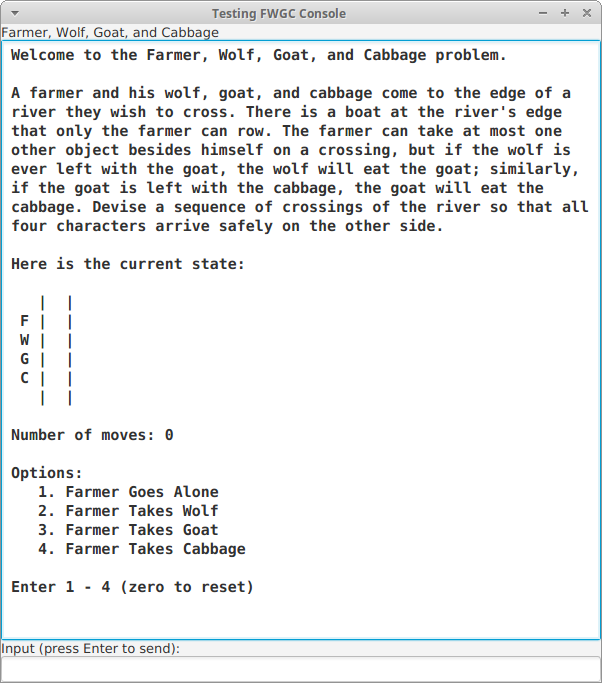
The Farmer, Wolf, Goat, and Cabbage (FWGC) problem is depicted in the
screenshot below.
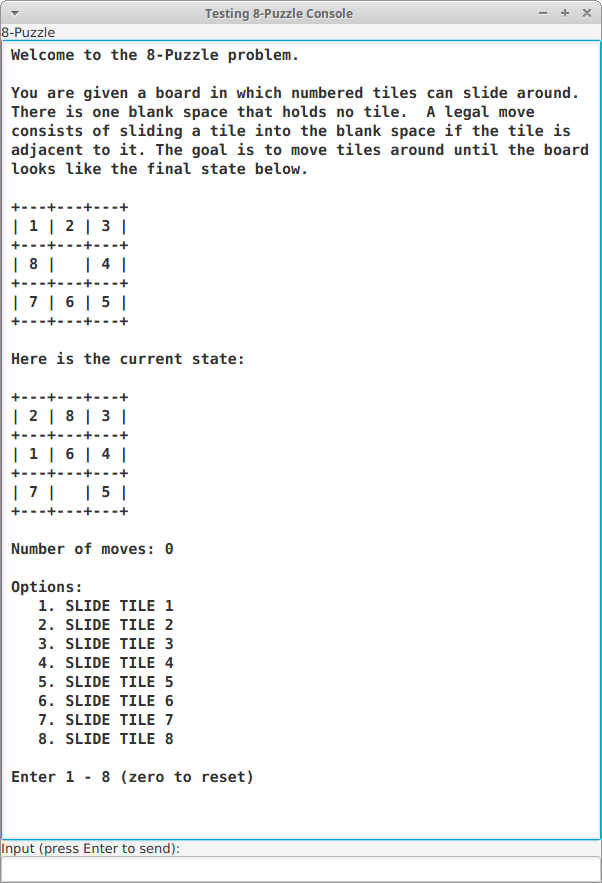
The 8-Puzzle problem is depicted in the
screenshot below.
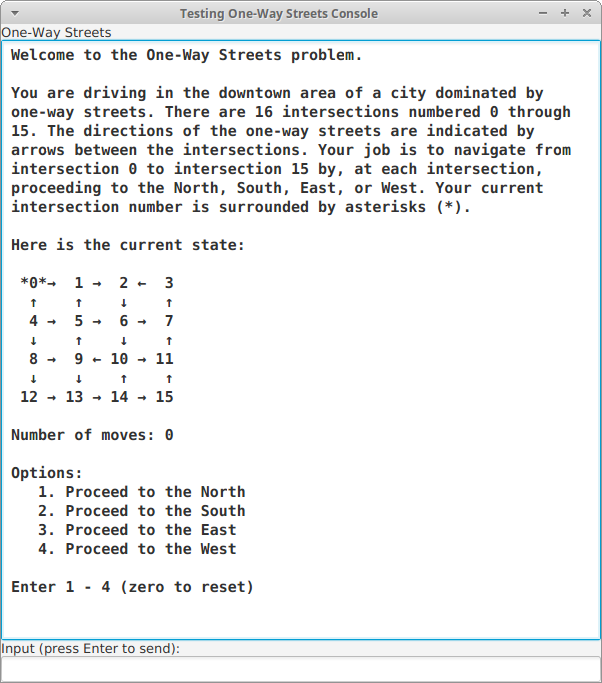
The One-Way Streets problem is depicted in the
screenshot below.
Frameworks often arise from the realization that separate program
applications have similar structure.
For example, in the farmer, 8-puzzle, and one-way streets problems,
- There is a fixed number of problem states
- There is a fixed number of well-defined possible moves
- The problem is to transform the current state into a goal
- The structure of the user interfaces is similar
Examining three separate implementations of these problems would reveal much
repeated code.
A framework manages repeated code so that it can be shared among
multiple applications.
This section presents the types involved in a problem solving
framework whose top-level package is called
framework.
The current types involved include both
abstract
and
concrete classes. Other types will be added as the framework
is developed.
The types are further divided into these sub-packages:
- framework.problem
- framework.solution
- framework.ui
Note that the code presented in this framework is
generic in the
sense that:
- Its terminology does not mention application domains
involving farmers, goats, 8-puzzles, one-way streets, etc.
- Instead, the concepts used (states, problems, consoles, etc.)
are generally applicable to any application domain; therefore the
code using these concepts is also applicable to multiple domains
and thus reusable.
The
framework.problem package contains the types relating
directly to problem representation, apart from the issues of problem
solution and interacting with the user.
These types are
State,
Mover, and
Problem.
A central concept is that of a
state of affairs of the problem
being solved.
Since this concept is to range over widely differing application
domains, we create an abstract class type called
State.
Extending classes will encapsulate the representation details
of concrete problem states.
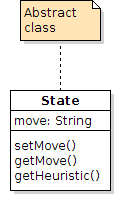
This type does not depend on any other type within the framework, so
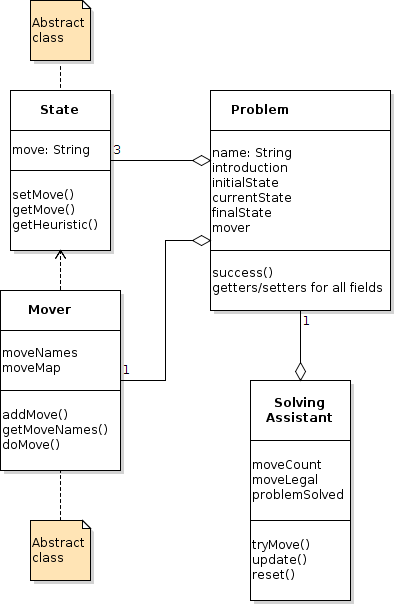
its UML model is simple and looks as shown below. The class code is
shown in
State.java.
- A State object holds the string naming the move that produced
it. Methods for accessing the move and producing the state's heuristic
value (discussed later in the course) are included.
- Extending classes are expected to override the
toString and equals methods,
inherited from the Object superclass.
The
Mover class represents the moves in a problem solving
domain.
A
Mover object collects the available move names and associated
functions that attempt to create new states as a result of making moves.
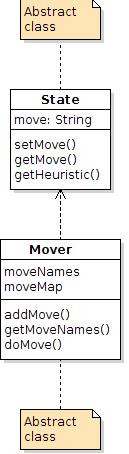
Since moves are applied to states,
Mover depends
on
State, as shown below. The class code is shown in
Mover.java.
Mover is made abstract so that it must be extended by classes
that specify move names and functions by calling the
addMove
method.
The most important elements of the
Mover class are
the
addMove and
doMove methods.
addMove:
- The type of the second argument to addMove,
UnaryOperator<State>, is a functional interface, or
interface with exactly one method. (UnaryOperator<T> is
defined in the library package java.util.function.)
- That method must take an argument of type State and return a
value of type State.
- Each move name for a problem application domain will be associated with
a functional object implementing the UnaryOperator<State> interface
on a hash map for constant-time look-up.
A hash map is a kind of hash table, a data structure that will
be discussed later, but if interested see Hash Tables on the menu.
doMove:
- When the user tries a move, the doMove method is called, which
uses the move name given as its first argument to look up the
functional object on the hash map and apply its single method,
functionally, to the state given as doMove's second
argument.
- If doMove successfully creates a new state, setMove
is called on it to set the move name that resulted in the state.
- Functional objects, or instances of functional interfaces, can be
specified in Java 8 through lambda expressions. Examples are
given in Using the Framework (see menu). Lambdas will be
discussed in more detail later, but if interested see Lambdas on
the menu.
The
Problem class collects all the information required to solve
a problem.
Getters and setters are provided for the problem name and
introduction, the initial, current, and final
States of the
problem, and the problem's associated
Mover object.
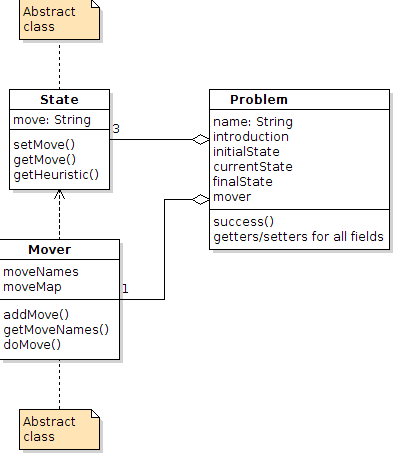
Since it stores various states and the mover object,
Problem
aggregates
State and
Mover objects, as shown below.
The class code is shown in
Problem.java.
The class is not abstract, but it can be subclassed, especially if the
success method needs to be overridden.
Neither
framework.problem nor
framework.solution contains
any code supporting user interaction. This is by design. Following
the
Model-View-Controller design pattern, we strictly separate
code that represents a problem and its solution from code that provides
a user interface.
The
framework.ui package contains types relating to user
interaction while solving problems.
Currently this package contains only one type,
ProblemConsole,
dedicated to interacting with users textually via a simulated terminal
console.
Eventually we will add types to support GUI (graphical user interface)
interaction.
The
ProblemConsole class does all the work of interacting with
the user and responding to attempts to make moves.
It extends the
Console class (from previous exercises) and
overrides its
handleInput method to get move options from the
user, check move legality, and update the display, which is entirely
text-based, using strings.
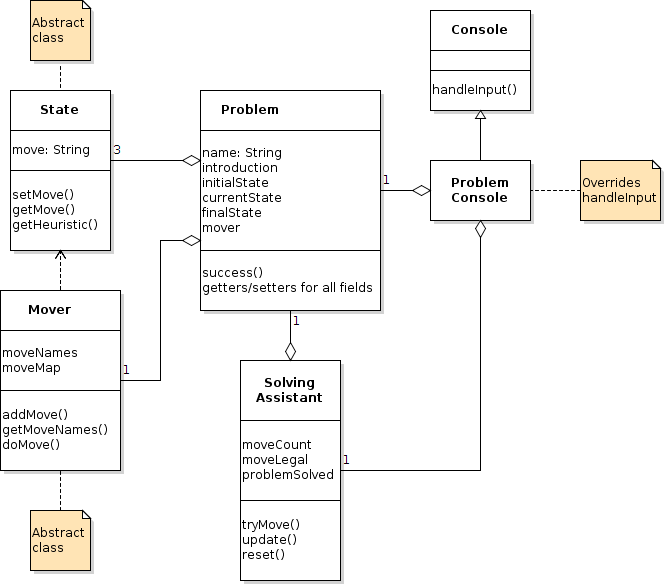
A
ProblemConsole object aggregates a single
Problem
object and a corresponding
SolvingAssistant object, as shown
below. The class code is shown in
ProblemConsole.java.
The
framework.solution package contains types relating to
representing solutions to problems.
Currently this package contains only one type,
SolvingAssistant,
dedicated to supporting the process of users manually solving problems.
Eventually we will add types to support automatic problem solving.
The
SolvingAssistant class provides support as moves are applied
to solve a problem.
It tries moves, updates the current state as necessary, keeps track
of the move count, and checks whether the problem has been solved.
These responsibilities require that
SolvingAssistant contain
a
Problem object, as shown below.
The class code is shown in
SolvingAssistant.java.
A framework by itself is not an executable application. A framework
user must provide code that "plugs in" to the framework code, resulting
in something executable.
In Java, plugging into a framework involves implementing framework
interfaces and extending framework classes.
This section provides an example of a dummy, though executable,
application of the problem solving framework just described. Actual
applications, like the FWGC and 8-Puzzle problems, are created in the
same way.
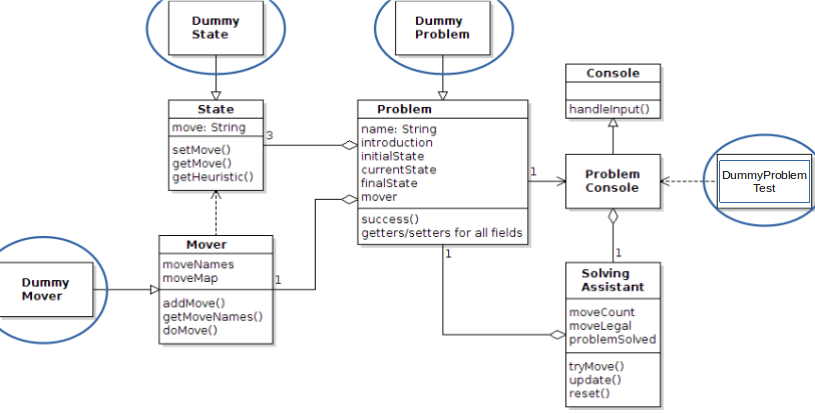
An application of the problem solving framework requires at least four
files. In the dummy application, these are:
- DummyState: extends the State class
- DummyMover: extends the Mover class
- DummyProblem: extends the Problem class
- DummyProblemTest: uses the ProblemConsole class to
create a JavaFX application
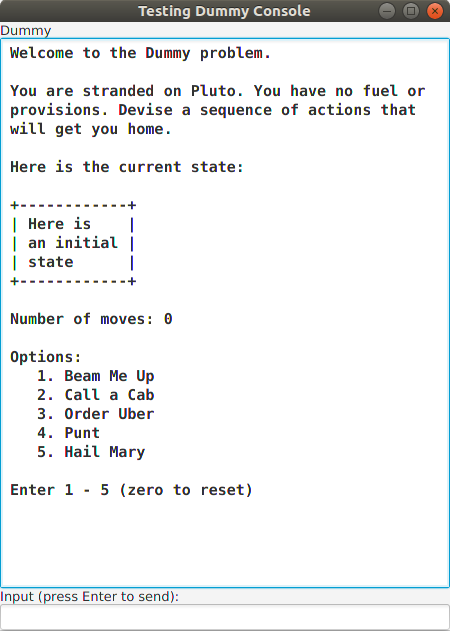
A screenshot of the dummy application of the problem solving framework is
shown to the right.
To see how it is used, refer to the
Using Framework Video (mp4) for this module.
Although the application does not do much, it demonstrates the features
of the framework:
- Move options 1–4 update the current state display
- Move option 5 demonstrates an illegal move
- Move option 3 demonstrates success
The class diagram below shows how the application files fit into the
framework.
The files for the dummy application are available on the menu to the
left.
Note that the classes are in a package called
domains.dummy.
DummyState (below) shows an example of state representation and the
required overriding of the
equals and
toString methods.
- The only content of a DummyState is a string that is
displayed in an enclosing box
- The toString method uses a StringBuilder to
display the content string
- The equals method simply checks for the equality of a
state's content string with that of its argument:
- Since the
argument parameter is of type Object, it must be cast
to DummyState
- Note the use of the equals method built into
the String class
- The hashCode method will be explained later in the
course
The
DummyMover class uses its parent's
addMove method to
add move names and their associated operations to the parent
class's hash map:
- The second argument to addMove is an instance of
a functional interface called UnaryOperator —
a function that takes a State as an argument and returns
a State as a value
- The functional argument is specified as a lambda
expression, for example,
s -> tryBeam(s)
- To the left of -> is
the lambda's parameters, in this case,
s, whose type can be
inferred to be State
- To the right of -> is
the lambda's body, in this case,
tryBeam(s), which, since it
returns a value of type State, means that the lambda
expression also returns State, which is required by the
UnaryOperator<State> interface.
- Functional objects and lambda expressions are a feature of
Java 8. They will be discussed in more detail, but if interested
see Lambdas on the menu.
The
DummyProblem class simply uses its parent's setters to
initialize the data (strings, states, and mover) required to represent
the problem.
The
DummyProblemTest class uses JavaFX to display
a
ProblemConsole that is wrapped around a
DummyProblem,
appropriately sized.
Since
DummyProblemTest extends the JavaFX
Application class,
it can be run by executing its
main method.
Running the
DummyProblemTest class produces the application shown in
the screen shot.